
Know what’s really in your food.
Stop guessing which product is better. Scan ingredients, compare products, and make confident choices in seconds.


Free to download · Works offline · No account needed
Three steps to a smarter choice
No barcode, no account, no waiting. Point your camera at the ingredients list and go.
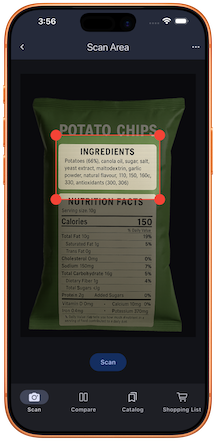
Scan the label
Point your camera at the ingredients list, even on curved cans and bottles. Food Scan Go reads the text on the spot.
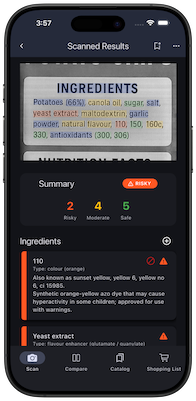
Decode every ingredient
Each additive and allergen is identified and explained in plain language, then color-coded by caution level.
Decide with confidence
Compare against other products, save the winners, and add them straight to your shopping list.
Scan. Understand. Decide.
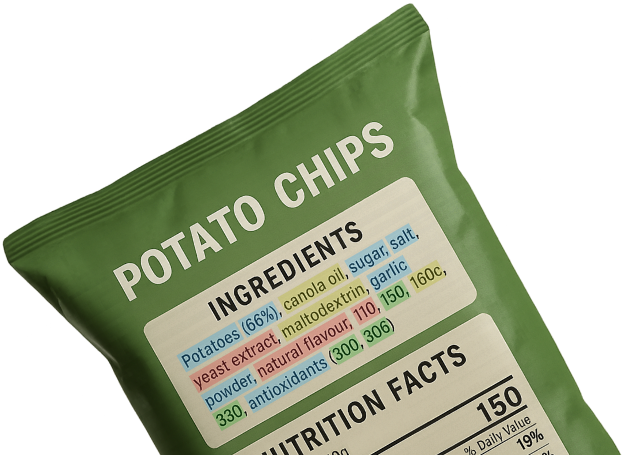
Just snap a photo of the ingredients label, Food Scan Go reads and analyzes it instantly.
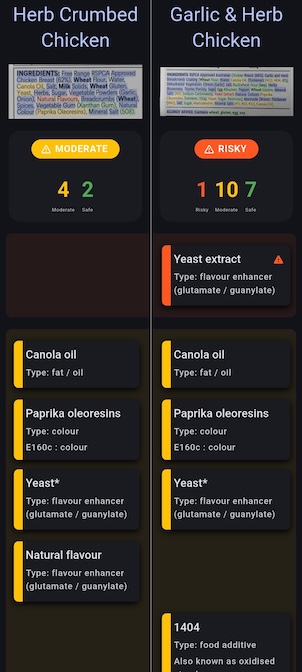
Ingredients are clearly color-coded by caution level, so you can understand them at a glance.
Compare products side-by-side to quickly find the better choice.
That cryptic E-number? Now it makes sense.
Food Scan Go translates additives and E-numbers into plain English (what they are, why they matter, and what regulators say), with links to the science. Tap one to try it:
A synthetic yellow azo dye (FD&C Yellow 5) derived from petroleum sources, used in candies, beverages and processed foods.
May trigger allergic reactions in sensitive people, especially those with aspirin sensitivity, and has been linked to hyperactivity and attention issues in some children.
Approved in the EU, US, Australia and Canada (EFSA ADI 7.5 mg/kg). The EU requires an “adverse effect on activity and attention in children” warning, and the US FDA plans to phase out FD&C Yellow 5 by the end of 2026.
In the app, tap any ingredient for full details and sources, including PubMed references. Examples shown for illustration.
Set your allergens once. We watch every label.
Tell Food Scan Go what you avoid, and it flags those ingredients in every scan, covering 25 allergens across US, EU and Asian labeling standards. Try tapping a few:
Tap an allergen to start watching it.
Based on FDA FALCPA (the Big 9), EU Regulation 1169/2011, and the FARRP international allergen chart.
Personalize caution levels to match what you care about.
Default caution levels follow regulatory limits and general scientific guidance, but everyone’s dietary needs are different. Personalize the caution level for any additive, and your saved products and future scans update to match.
Set a personalized caution level for any additive, and Food Scan Go remembers it everywhere, for every future scan.
Privacy, built in.
Food Scan Go works entirely offline1.
Your photos and scans stay on your device, never uploaded or shared.
1 Only anonymized crash reports and performance metrics are collected to improve reliability, never your photos or personal data.
Shop smarter, faster.
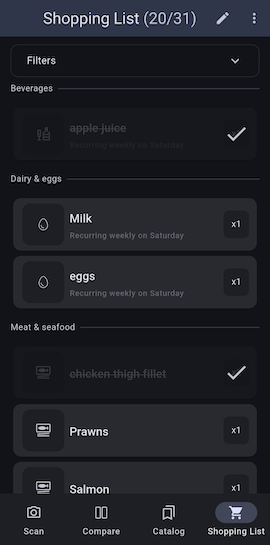
Save your favorite products and compare new items against them.
Build shopping lists in seconds and organize them by store or category.
Spend less time reading labels and more time choosing the right product.
Questions, answered.
Do I need a barcode to scan a product?
No. Food Scan Go reads the actual ingredients list on the packaging, so it works on products that aren’t in any barcode database, including local, imported and store-brand items.
Does it work offline?
Yes. Scanning and ingredient analysis run entirely on your device. You don’t need a connection, and your photos never leave your phone.
Do I need to create an account?
No account required. Just download the app and start scanning.
Which allergens can it flag?
25 in total: the FDA “Big 9” (milk, eggs, fish, crustacean shellfish, tree nuts, peanuts, wheat, soy, sesame) plus EU and Asia-specific ones like mustard, celery, lupin, sulphites, gluten and buckwheat.
Can it scan cans and bottles?
Yes. As you rotate a curved package, Food Scan Go captures and stitches multiple shots together so it can read labels that wrap around the container.
Is it free?
Food Scan Go is free to download on the App Store and Google Play. Scanning is always free and unlimited.
Start scanning and make better choices today.